Usage as a Font
You can use Boxicons as an icon font to quickly embed icons into your website or application. This is the easiest way to get started and works great for static sites, dashboards, and traditional web projects.
Using the font version allows you to control icon size, color, and alignment using simple CSS — just like text.
Import the CSS
To get started, include the Boxicons stylesheet in the <head> of your HTML file. This will load the Boxicons font into your page.
Free icons
<!-- Basic Icons -->
<link href="https://cdn.boxicons.com/3.0.8/fonts/basic/boxicons.min.css" rel="stylesheet">
<!-- Filled Icons -->
<link href="https://cdn.boxicons.com/3.0.8/fonts/filled/boxicons-filled.min.css" rel="stylesheet">
<!-- Brand Icons -->
<link href="https://cdn.boxicons.com/3.0.8/fonts/brands/boxicons-brands.min.css" rel="stylesheet">
All font files are hosted on a fast and reliable CDN for easy global delivery.
For Pro Users
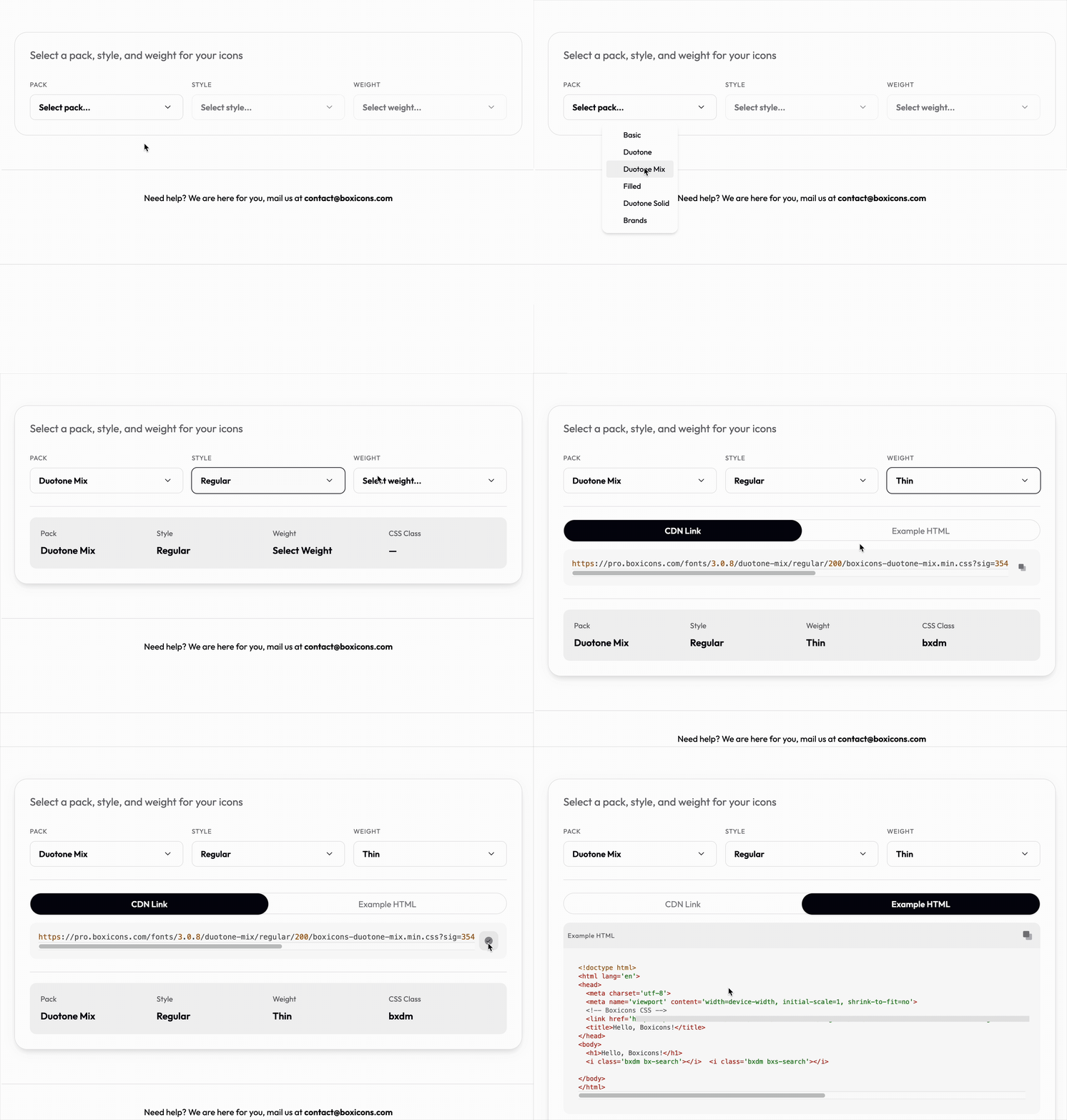
If you are a Boxicons Pro user, you can generate a custom CDN link from the Usage page. There, you can select exactly which pack, style, and weight you want to include in your project.
The Usage link can be found in the icon mini-viewer and in the avatar dropdown menu.
Using Icons in HTML
To render an icon, add an i tag with the icon’s class name.
bx-prefix is used for all icons
When using multiple fonts please make sure the basic pack link tag is on top , followed by the rest
Example:
<!--  <i class="BX_CLASS BX-ICON_NAME"> -->
<i class="bx bx-volleyball"></i>
<i class="bxf bx-volleyball"></i>
<i class="bxl bx-twitter"></i>
Class Names
| Pack | Style | Class |
|---|---|---|
| basic | regular | bx |
| basic | rounded | bxr |
| basic | sharp | bxs |
| filled | regular | bxf |
| filled | rounded | bxrf |
| filled | sharp | bxsf |
| duotone | regular | bxd |
| duotone | rounded | bxrd |
| duotone | sharp | bxsd |
| duotone-solid | regular | bxds |
| duotone-solid | rounded | bxrds |
| duotone-solid | sharp | bxsds |
| duotone-mix | regular | bxdm |
| duotone-mix | rounded | bxrdm |
| duotone-mix | sharp | bxsdm |
| brands | regular | bxl |
Starter Template
Here’s a minimal HTML template to get you started:
<!doctype html>
<html lang='en'>
<head>
<meta charset='utf-8'>
<meta name='viewport' content='width=device-width, initial-scale=1, shrink-to-fit=no'>
<!-- Boxicons CSS -->
<link href='https://cdn.boxicons.com/3.0.8/fonts/basic/boxicons.min.css' rel='stylesheet'>
<link href='https://cdn.boxicons.com/3.0.8/fonts/filled/boxicons-filled.min.css' rel='stylesheet'>
<link href='https://cdn.boxicons.com/3.0.8/fonts/brands/boxicons-brands.min.css' rel='stylesheet'>

<title>Hello, Boxicons!</title>
</head>
<body>
<h1>Hello, Boxicons!</h1>
<i class='bx bx-hot'></i>
<i class='bxf bx-fire'></i>
<i class='bxl bx-twitter-x'></i>
</body>
</html>
You can also access the SVG’s from our CDN at:
https://cdn.boxicons.com/3.0.8/svg/<PACK_NAME>/<ICON_NAME_WITH_PREFIX_BX>.svg

<img src="https://cdn.boxicons.com/3.0.8/svg/basic/bx-8-ball.svg" alt="8-ball"/>
<img src="https://cdn.boxicons.com/3.0.8/svg/filled/bx-8-ball.svg" alt="8-ball"/>
<img src="https://cdn.boxicons.com/3.0.8/svg/brands/bx-facebook.svg" alt="facebook"/>